
- Google Business Profile Address Change Blocked: A Commonly Misunderstood Problem
- Full Transparency: An Important Point
- Real SEO Diagnosis: Why Is Google Blocking the Address Change?
- Critical Issue: A Second Google Business Profile Was Created
- A Clean and Effective Strategy for Changing Your Google Business Profile Address
Google Business Profile Address Change Blocked: A Commonly Misunderstood Problem
Have you moved your business and Google refuses to approve the address change on your Google Business Profile, formerly known as Google My Business?
👉 You are not alone.
👉 And no, it is not necessarily a technical bug.
This type of block requires the intervention of a Google Business Profile expert, capable of understanding Google’s verification mechanisms and preventing any permanent suspension of the listing.
Here, I’m sharing a real SEO audit, based on a concrete case, to explain why Google blocks address changes, what you absolutely shouldn’t do, and most importantly, what clean and sustainable strategy can maximize your chances of validation without jeopardizing your listing.

Full Transparency: An Important Point
Before anything else, let’s be clear:
❌ No agency, freelancer, or so-called “Google Business Profile expert” can guarantee 100% approval of an address change.
Why?
Because Google is an independent third party with its own verification systems, anti-spam policies, automated checks, and, in some cases, manual reviews.
👉 My role is not to make unrealistic promises. It is to:
- Understand the actual reason behind the restriction.
- Protect the existing business profile.
- Ensure your business information is consistent.
- Provide Google with clear and legitimate signals.
- Prepare the strongest possible evidence for the verification process.
- Maximize the chances of approval without using risky or manipulative tactics.
That is what a serious Google Business Profile strategy should look like.
Real SEO Diagnosis: Why Is Google Blocking the Address Change?
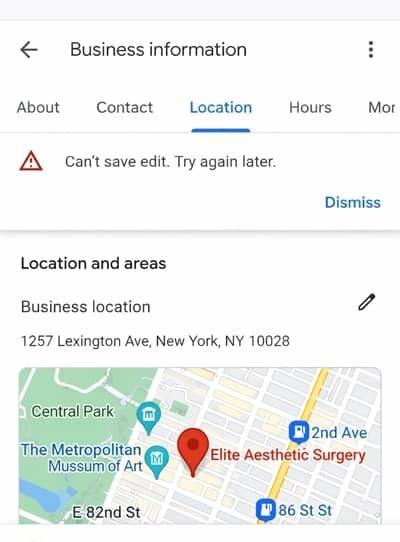
In this particular case, the problem was not simply an incorrectly formatted address or a basic technical error.
Main Cause Identified
The profile appeared to require additional verification following a significant relocation.
When a business moves a considerable distance, Google may apply additional checks to determine whether the business is genuinely operating at the new location.
These checks can help Google detect situations such as:
🔹 Business profile transfers or sales.
🔹 Fake business relocations.
🔹 Duplicate profiles.
🔹 Local spam or misleading business information.
👉 This type of verification can be frustrating, but it is part of Google’s effort to maintain the accuracy of local search results.
This situation falls directly within Google Business Profile SEO, and it requires a different approach from standard profile optimization.
Critical Issue: A Second Google Business Profile Was Created
Another issue identified during the audit was the creation of a new Google Business Profile in Paris.
Although the intention may have been understandable, creating another profile for the same business can create additional complications.
Why Can This Be a Problem?
Google generally expects eligible businesses to maintain an appropriate profile rather than creating multiple profiles for the same business and location.
Duplicate profiles can create:
- Conflicting business information.
- Verification problems.
- Duplicate listings.
- Confusion about which profile represents the legitimate business.
Recommended Action
✔️ Review the recently created profile.
✔️ Determine whether it is a duplicate.
✔️ Follow Google’s process for removing or merging duplicate profiles where applicable.
✔️ Keep the legitimate business profile as the primary profile.
Without resolving duplicate or conflicting profiles, it becomes much harder to establish a clear and consistent business identity.
What You Should Never Do
Several actions can make an already complicated situation worse, even if they seem logical.
❌ Change the address repeatedly.
❌ Create multiple profiles to bypass verification.
❌ Repeatedly submit the same request without addressing the underlying issue.
❌ Change important business information unnecessarily during an active review.
❌ Attempt to manipulate the verification process.
❌ Use an address that does not accurately represent the business.
👉 Google does not respond to pressure. It responds to consistent, accurate and verifiable business information.
This is precisely why a professional audit can be useful before making another major change to a restricted business profile.
A Clean and Effective Strategy for Changing Your Google Business Profile Address
Here is the structured approach I use when dealing with sensitive address-change cases.
Address verification is part of a broader local SEO strategy where consistency between your Google Business Profile, website and external business information can help establish a stronger and more trustworthy business presence.
1. Clean Up and Stabilize the Profile
The first step is to establish a clean foundation.
This may involve:
- Reviewing any duplicate profiles.
- Removing or resolving unnecessary conflicting information.
- Avoiding unnecessary changes while the situation is being reviewed.
- Keeping one legitimate profile representing the business.
🎯 Objective: Create a clear and consistent business identity.
2. Align Your External Business Signals
Before attempting another address change, your online business information should be reviewed carefully.
This includes:
✔️ Your official business website.
✔️ Legal information and contact details.
✔️ Address information displayed on relevant pages.
✔️ Organization or LocalBusiness structured data where appropriate.
✔️ Social media profiles.
✔️ Apple Maps and Bing Places.
✔️ Relevant business directories.
✔️ Other important local citations.
👉 The goal is consistency.
Google should be able to understand that the business represented by the Google Business Profile is the same real-world business represented across your online presence.
3. Clean Up the Old Address Online
One of the most important steps after a relocation is reviewing your old address across the web.
I identify websites and directories where the previous address still appears and, where possible, request corrections or updates.
This may include:
- Local directories.
- Industry directories.
- Social profiles.
- Business listings.
- Partner websites.
- Local citation platforms.
The objective is to improve NAP consistency:
Name – Address – Phone
🎯 A consistent business footprint can make your relocation easier to understand for users and search engines.
4. Create or Improve the Business Website
In some cases, the existing website can weaken the overall local SEO strategy.
I may therefore recommend:
- Creating a professional website.
- Redesigning the existing website.
- Improving its technical SEO.
- Updating the business address.
- Strengthening local service pages.
- Improving the site’s entity and business information.
The objective is not to create a website simply to “unlock” Google verification.
Instead, the website should provide a reliable, professional representation of the business and reinforce the consistency of the information associated with the business online.
A properly optimized WordPress website can therefore become an important part of the broader local SEO strategy.
5. Prepare a Strong Verification File
Once the business information is consistent, the next step is to prepare legitimate evidence of the relocation and business activity.
Depending on the situation, this may include:
- Lease or rental documents.
- Utility bills.
- Official business documents.
- Invoices.
- Business registration documents.
- Photos of the premises.
- Exterior signage.
- Evidence showing continuity of the business.
- Evidence demonstrating that the same business continues to operate.
The exact documents Google accepts can vary depending on the verification process offered to the business.
6. Submit a Controlled Request and Escalate When Appropriate
Once everything has been reviewed:
✔️ Submit the address change through the appropriate Google Business Profile process.
✔️ Provide accurate information and legitimate supporting evidence.
✔️ Avoid making unnecessary changes while the request is being reviewed.
✔️ If the request is rejected or additional verification is required, use Google’s official support channels and provide a clear explanation.
The objective is to make the situation as easy as possible for Google to understand.
Realistic Timeframes
There is no guaranteed timeframe for an address-change verification because Google’s review process varies depending on the business and the verification method.
As a planning estimate, a complete local SEO cleanup and preparation process may take several weeks.
For example:
- Business information and NAP cleanup: 2–3 weeks.
- Website creation or redesign: 14–30 days.
- Google verification and support process: potentially 2–6 weeks or longer, depending on the case.
⏱️ Estimated overall project timeframe: approximately 4–8 weeks.
These are planning estimates, not guarantees from Google.
Transparent Pricing
🔹 Website Creation or Redesign: From $900
Objective: Build a professional and SEO-friendly foundation aligned with your business information and local search strategy.
🔹 NAP Cleanup + Verification Preparation + Google Support Guidance: $800
This includes reviewing your business information, identifying inconsistencies, preparing the necessary evidence and guiding the verification process.
🔹 Address Change Success Fee: $400
This fee is charged only if the address change is successfully approved.
Conclusion: Strategy, Not Panic
A blocked Google Business Profile address change should not be handled in a rush.
The right approach is to:
- Start with a proper diagnosis.
- Resolve duplicate or conflicting information.
- Clean up the old address across relevant platforms.
- Align your website and external business information.
- Prepare legitimate supporting evidence.
- Follow Google’s verification process carefully.
- Escalate through official channels when necessary.
My approach focuses on building clear, consistent and verifiable signals around the business while minimizing unnecessary risks to the existing profile.
If you choose this strategy, I can take care of:
- The website or SEO improvements.
- Old-address cleanup.
- NAP consistency.
- Verification preparation.
- Business documentation review.
- Guidance throughout the Google Business Profile verification process.
Need a Professional Google Business Profile Audit?
If you are facing a rejected address change, you can contact me for a Google Business Profile audit to accurately assess your situation. I’m available to discuss your case and explore the best solution.




0 Comments