
- Why Is Your Google Maps Listing Suspended?
- Reactivating a suspended Google listing:
- How to Write an Effective Request
- Real Client Case
- Need a Google My Business Expert?

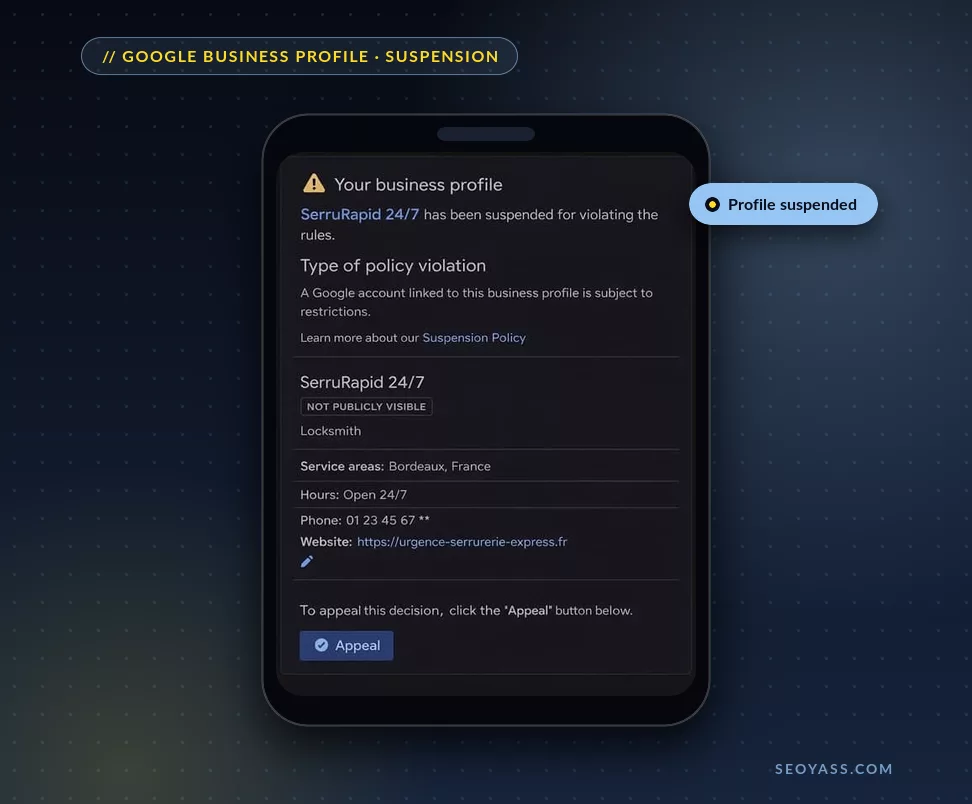
If your Google Business Profile (formerly Google My Business) is suspended, your business becomes invisible on Google and Google Maps.
👉 In practical terms:
❌ You no longer appear in local search results
❌ Customers can’t contact you anymore
❌ Your traffic and leads drop instantly
👉 But here’s the good news:
A suspended listing can be recovered with the right strategy.
Why Is Your Google Maps Listing Suspended?
Contrary to popular belief, a suspension is almost never caused by a single issue.
👉 Google evaluates:
- Your overall consistency
- Your credibility
- Your compliance with guidelines
- Most Common Causes of Google My Business Suspension
1. Inconsistent Information (NAP + Hours)
Google compares your data across:
- Your website
- Social media
- Business directories
❌ If your hours or contact details differ → possible suspension
2. Too Many Changes
Frequent updates to:
- Business hours
- Address
- Phone number
- Category
👉 Send a suspicious signal
⚠️ Example:
Changing hours + address = high risk
3. Invalid Address
- Virtual office
- PO box
- Non-existent address
👉 Google requires a real physical presence to appear on Google Maps
4. Violation of Google Guidelines
Google Business Profile guidelines prohibit:
- Adding keywords to your business name
- Creating duplicate listings
- Listing an ineligible business
5. Incorrect Service Area Setup
If you run a service-area business:
❌ Do not display your address
✔️ Define your service area
6. Online-Only Business
👉 If you have no physical interaction with customers:
❌ You are not eligible for Google Business Profile
7. Competitor Report
👉 Your listing can be flagged and manually reviewed
8. Sensitive Industries
Some industries are more closely monitored:
- Taxi / Ride-hailing
- Locksmith
- Roofing
- Chiropractor
- Plumber
- Lawyer
- SEO Consultant
9. Misleading Business Hours
- Claiming “24/7” when it’s not true
- Hours inconsistent with your website
10. Incorrect Website Link
Redirecting to another business
Linking only to social media
11. Duplicate Listings
Creating multiple listings for the same business:
❌ Not allowed without valid justification
12. Multiple Listings at the Same Address
👉 Except in specific cases (malls, separate offices)
13. Access from External Accounts
If an agency or freelancer has access:
👉 A suspended account can impact your listing
14. Lack of Proof of Legitimacy
- No website
- Weak online presence
- Limited reliable information
15. New or Inactive Listing
👉 Google may consider your business unstable
Reactivating a suspended Google listing:
Step 1: Fix Issues Before Submitting a Request
👉 Don’t make the mistake of submitting too early
Checklist:
✔️ Align your information everywhere
✔️ Correct hours and address
✔️ Remove duplicates
✔️ Stabilize your listing
Step 2: Prepare Strong Evidence
To recover your listing, prepare:
Business registration documents
Professional license
Company registration (KBIS)
Photos of your premises
Utility bills (electricity, internet…)
👉 Everything must match perfectly
Step 3: Submit a Reinstatement Request
Through Google Business Profile support
👉 Important:
- You have 60 minutes to submit your evidence
- Prepare everything in advance
How to Write an Effective Request
Your message should:
- Explain the corrections made
- Prove compliance
- Reassure Google about your business
👉 Be clear, precise, and professional
How Long Does It Take?
3 to 10 days on average
Sometimes longer depending on the case
Request Rejected: What to Do?
👉 One last option:
➡️ Final review request
⚠️ Your case must be flawless
After Reinstatement: Optimize for Google Maps
A recovered listing is a strategic opportunity.
Actions to take:
- Local SEO optimization
- Collect customer reviews
- Add photos
- Publish regularly
👉 Goal: Reach the top position on Google Maps
Real Client Case
👉 Local business with suspended listing
Issues:
- Frequent changes in hours
- Inconsistent address
- Too many edits
✅ Results after optimization:
Listing recovered in 3 days
+40% calls in 1 month
Conclusion
A Google My Business suspension is never random.
👉 It is caused by:
- Lack of consistency
- Poor setup
- Or violation of guidelines
Take Action
Every day without visibility on Google Maps = lost customers
👉 The right method:
Fix → Prove → Request → Optimize
Need a Google My Business Expert?
Is your listing suspended and you don’t know where to start?
Every wrong move can delay reactivation… or even permanently block your profile.
👉 That’s exactly where I come in
As a local SEO expert, I help you with a 100% compliant and results-driven approach.
What I Do for You
✅ Fast recovery of your Google Maps listing
→ Full audit + strategic fixes to maximize reinstatement chances
✅ Long-term profile security
→ Full compliance to prevent future suspensions
✅ Advanced local SEO optimization
→ Ranking on Google Maps with high-potential keywords
✅ Qualified lead generation
→ Turn your listing into a powerful acquisition channel
💡 Goal:
Not just recover your listing… but build a local asset that generates revenue continuously.



0 Comments