
If you are wondering how to create a WordPress website, it is probably because you want to strengthen your online presence and attract more visitors to your business.
Creating a WordPress website may seem complicated at first, but with the right tools and a clear process, it is accessible to everyone, even without technical skills.
Follow this step-by-step guide to build a professional, modern, and SEO-optimized website.
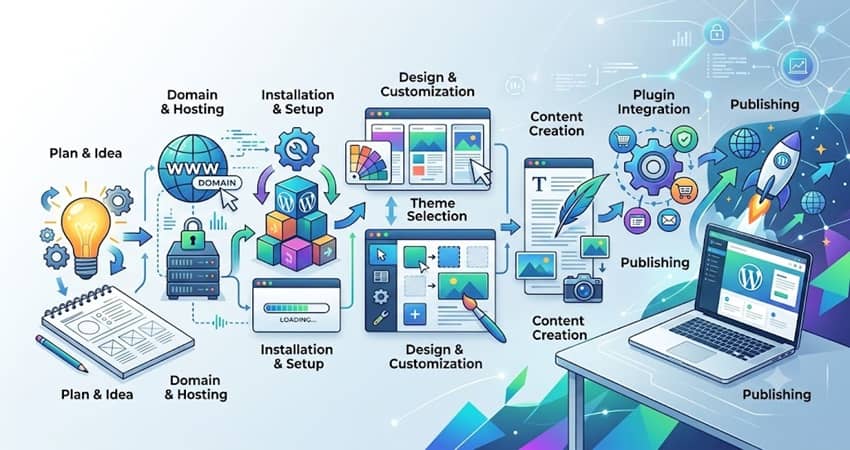
1. Choose a Domain Name and Web Hosting
Domain Name
Your domain name is your website’s address (e.g., mywebsite.com). Choose a domain name that is:
🔹 Short and easy to remember
🔹 Relevant to your business
🔹 Using an appropriate extension (.com, .co.uk, etc.)
👉 Examples of domain registrars: OVH, Gandi, IONOS
💡 Discover why I chose the name “SeoYass” as my domain name for my website.
Web Hosting
Choose WordPress-optimized hosting. Here are the main criteria to consider:
🔹 One-click WordPress installation
🔹 Automatic backups
🔹 Responsive customer support
👉 Recommended providers: O2Switch, OVH
2. Install WordPress
Automatic Installation
Most hosting providers offer one-click WordPress installation directly from your customer dashboard.
Manual Installation (Optional)
🔹 Download WordPress from wordpress.org
🔹 Upload the files via FTP (e.g., FileZilla)
🔹 Create a MySQL database
🔹 Start the installation through your web browser
3. Choose a WordPress Theme
A theme determines the visual appearance and overall design of your website.
Where to Find WordPress Themes
Free themes are available in the official WordPress theme directory.
Premium themes are available on ThemeForest and Elegant Themes.
Recommendations
🔹 Responsive and mobile-friendly
🔹 Lightweight and fast-loading
🔹 Easy to customize without coding (e.g., Astra, OceanWP, Divi, GeneratePress)
4. Install Essential WordPress Plugins
Plugins add additional features and functionality to your website. Here are some of the essential plugins:
| Feature | Recommended Plugin |
|---|---|
| Security | Wordfence, iThemes |
| SEO | Rank Math, Yoast SEO |
| Backup | UpdraftPlus |
| Caching (speed) | WP Rocket, W3 Total Cache |
| Contact forms | WPForms, Contact Form 7 |
| GDPR (cookies) | Complianz, CookieYes |
5. Create the Essential Pages
The basic pages to create for any professional website include:
🏠 Home
🧾 About Us
📞 Contact
🛠 Services / Products
📚 Blog (if needed)
⚖️ Legal Notice & Privacy Policy (required in Europe)
6. Customize Your Website
Customizing Your Website Through WordPress
🔹 Appearance > Customize: logos, colors, typography, menus
🔹 Widgets: additional content areas such as sidebars and footers
Visual Page Builders (Drag & Drop)
🔹 Elementor (one of the most popular)
🔹 Divi Builder
🔹 Beaver Builder
7. Optimize Your Website for SEO
Basic SEO Tips
🔹 Use an SEO plugin
🔹 Write clear and relevant page titles and meta descriptions
🔹 Structure your content with H1, H2, H3, and other heading levels
🔹 Optimize your images (file size + ALT attributes)
Bonus
🔹 Add your website to Google Search Console
🔹 Create an XML sitemap
🔹 Install Google Analytics
Once your website is optimized, you need to make sure people can actually find it!
Although WordPress automatically makes your new pages discoverable by search engines, it is important to check that everything is working correctly and help Google discover your pages efficiently.
7.1 How to Get Your WordPress Website Indexed
After creating and optimizing your WordPress website, it is essential to make sure Google can discover your pages easily.
Indexing allows search engines to crawl and store your pages in their index, which is essential for appearing in search results.
To make sure your website can be indexed properly, first check in WordPress that the option preventing search engines from indexing your site is not enabled (Settings > Reading).
Next, use Google Search Console to request indexing for your pages when necessary.
You should also create and submit your XML sitemap using an SEO plugin such as Yoast SEO or Rank Math. This helps Google discover your website’s pages more efficiently.
By following these steps, you can improve your chances of getting your website properly indexed and gaining visibility in search results.
👉 To learn more, visit my page: How to Get Your WordPress Website Indexed.
8. Secure and Back Up Your Website
Never overlook website security:
🔹 Use a strong password + two-factor authentication
🔹 Limit login attempts
🔹 Perform regular automatic backups
🔹 Keep WordPress, themes, and plugins up to date
9. Launch and Promote Your Website
Test Everything Before Launch
🔹 Links
🔹 Mobile display
🔹 Contact forms
Promote Your Website
🔹 Social media
🔹 Google Business Profile (for local businesses)
🔹 Paid advertising (Google Ads, Facebook Ads)
Take Action: Create a Professional WordPress Website
Creating a WordPress website is not as complicated as it may seem when you follow a clear and structured process.
With reliable hosting, a quality theme, the right plugins, and a little attention to detail, you can build a professional and high-performing website within a few hours or days.
If you need help creating a website, improving your SEO, or promoting your online presence, SeoYass, WordPress SEO Consultant, can help you develop an effective strategy tailored to your business.


0 Comments